


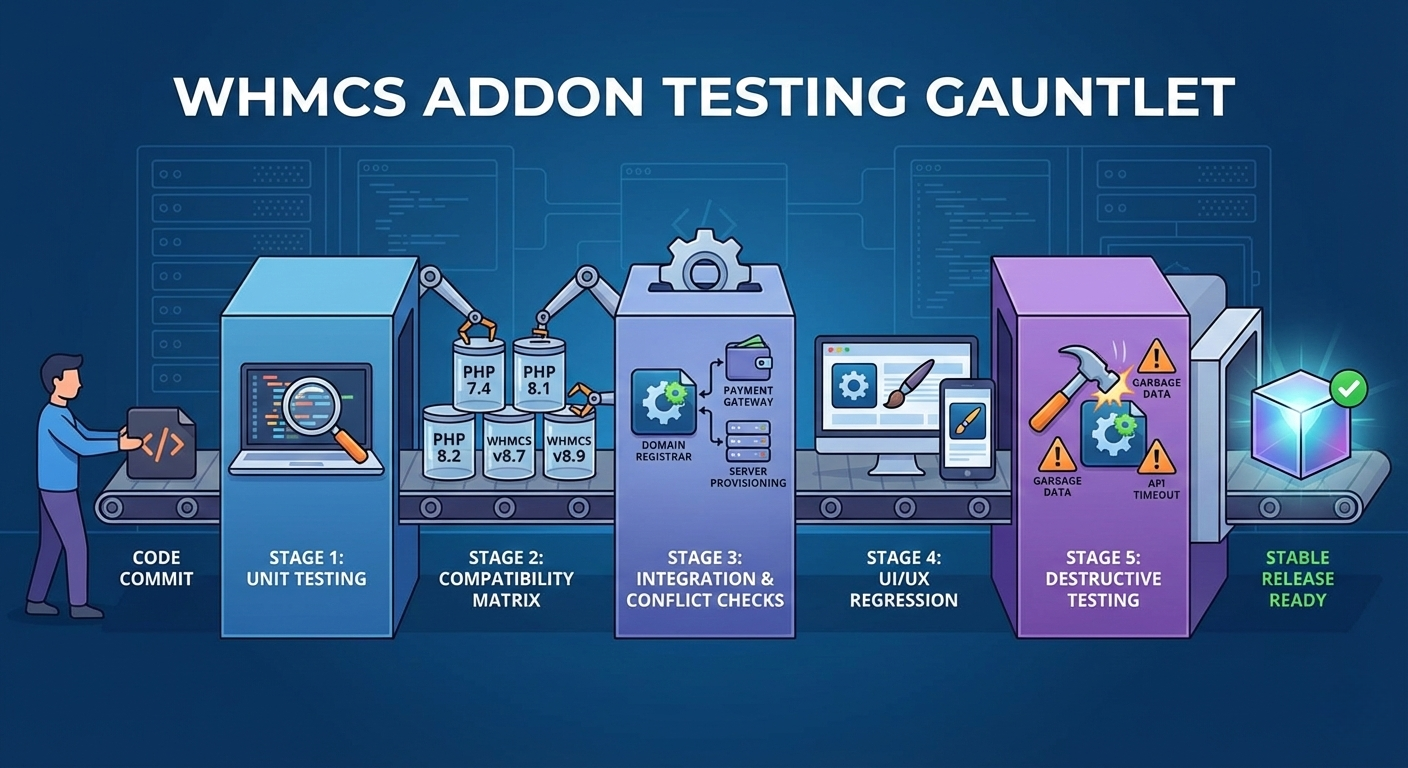
In the high-stakes world of web hosting automation, a “White Screen of Death” isn’t just an annoyance—it stops revenue. Here is how we ensure our modules are stable before they ever touch your production server.
If you run a web hosting or IT service business, WHMCS isn’t just software; it’s your central nervous system. It handles provisioning, manages support tickets, and, most importantly, processes payments.
Because WHMCS is so critical, installing a third-party addon requires a massive leap of trust. We have all experienced the nightmare scenario: deploying a new module on a Friday afternoon, only to find the checkout process is broken or the admin panel has thrown a fatal error.
At [Your Company Name], we understand the stakes. We know that “it works on my machine” is an unacceptable standard when dealing with billing automation.
We believe that reliability is the primary feature of any WHMCS addon. Before any module we build reaches public release, it must survive a rigorous, multi-stage testing gauntlet.
Here is a peek behind the curtain at how we ensure stability in an increasingly fragmented WHMCS ecosystem.
The Challenge: The “Fragmentation Matrix”
Developing for WHMCS is uniquely challenging because the environment is rarely standard.
A host might be running the absolutely latest version of WHMCS on PHP 8.2 with an Nginx server. Another host might be running a version of WHMCS that is six months old on PHP 7.4 with Apache and a highly customized theme.
Our addons must work seamlessly on both. This leads to what we call the “Fragmentation Matrix.” We have to test across a grid of differing variables to ensure broad compatibility.
Here is the process we use to conquer that matrix.
Stage 1: Local Developer Sandbox & Unit Testing
Testing begins the moment code is written. Every developer on our team runs isolated local instances of WHMCS.
Before a developer is allowed to commit code to our central repository, they must prove that their new feature or bug fix works in isolation. We utilize PHPUnit for backend logic to ensure that specific functions perform exactly as expected when fed different types of data.
If the foundation isn’t solid, we don’t build on top of it.
Stage 2: The Compatibility Matrix (Containerized Testing)
This is where the heavy lifting happens. Once code passes local checks, it moves to our automated testing environment.
We utilize containerization technology (like Docker) to spin up temporary, clean WHMCS installations in dozens of different configurations. We automate tests that install and activate our addon against:
- PHP Versions: We test against all currently supported PHP versions for WHMCS (e.g., PHP 7.4, 8.1, and 8.2) to catch deprecation notices or syntax errors.
- WHMCS Versions: We test not just on the current stable release, but also on the previous 2-3 minor versions to ensure backward compatibility for hosts who haven’t upgraded yet.
- Database Types: Checking compatibility against both MySQL and MariaDB.
If an addon throws a critical error on WHMCS v8.7 running PHP 7.4, our automated systems flag it, and the release is halted.
Stage 3: Integration and Hook Conflict Testing
WHMCS is a crowded ecosystem. Your installation likely already has modules for payment gateways, domain registrars, and server provisioning.
Many addons rely on WHMCS “hooks” (actions triggered when events happen, like an invoice creation). If two modules fight over the same hook without proper prioritization, chaos ensues.
We test our addons alongside common industry-standard modules to ensure we aren’t interfering with critical paths like checkout flows, support ticket submission, or gateway callbacks.
Stage 4: Theme and UI/UX Regression
It’s not enough for the code to work; it has to look right, too. A broken layout in the client area erodes trust with your customers.
We manually verify our addon’s front-end output against:
- Standard Themes: The default “Twenty-One” and the classic “Six” themes.
- Admin Themes: Ensuring admin area outputs don’t break standard admin styling.
- Responsive Checks: Verifying that client-area features work on mobile devices.
Stage 5: Destructive (“Garbage Data”) Testing
The final stage involves trying to break what we just built. We stop acting like a “good user” and start acting like a chaotic one.
- What happens if we input emojis into a phone number field the addon is processing?
- What happens if the external API our addon relies on times out or sends back a 500 error?
- What happens if a cron job runs twice simultaneously?
We aim to ensure that if things go wrong, they fail gracefully with clear logs and user-friendly error messages—never a fatal white screen.
Our Commitment to Stability
Shipping code is easy. Shipping stable code that doesn’t disrupt a live billing environment is hard.
By investing heavily in this multi-stage testing process, we aim to take the anxiety out of clicking that “Activate” button in your WHMCS admin area. Your business relies on stability, and our development process reflects that reality.
0 Comments