
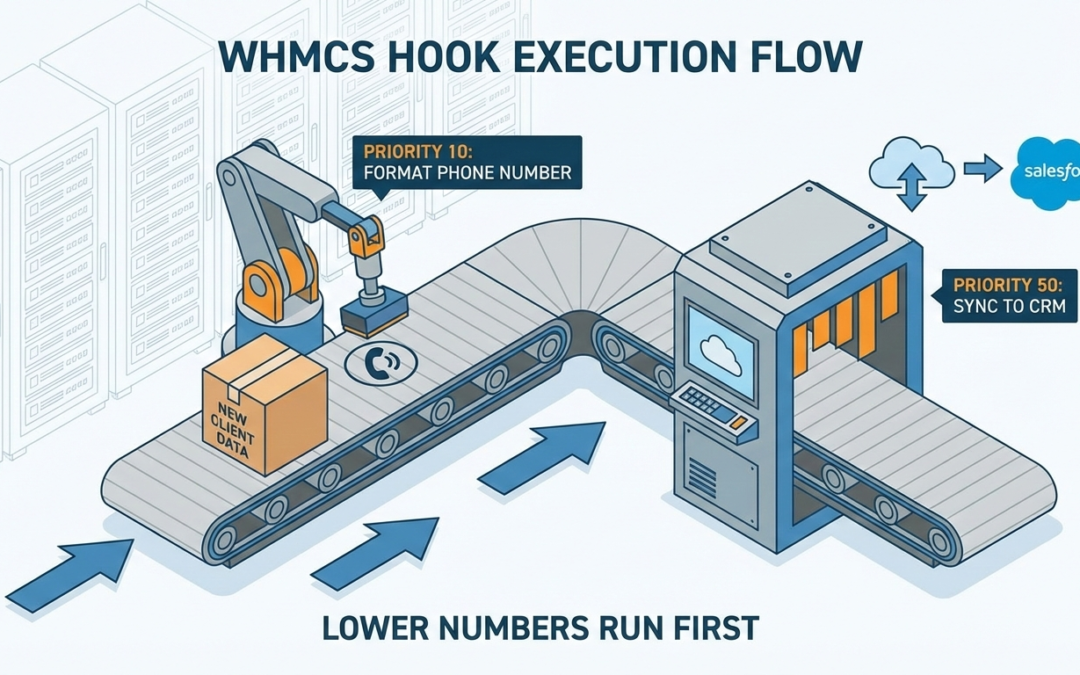
When multiple custom actions fire on the same WHMCS trigger, who goes first? If you leave it to chance, you’re inviting race conditions and data errors. Here is how to master hook priority.
If you are customizing WHMCS, hooks are your best friend. They allow you to inject custom logic at specific points in the automation lifecycle—like when a ticket is opened, an invoice is paid, or a client registers.
But as your customizations grow, you will inevitably run into a common problem:
What happens when you have two different custom modules that both want to run on the exact same trigger?
Imagine five people trying to walk through a single doorway at the exact same time. It’s chaotic, and you don’t know who is going to make it through first. In software development, this is a type of “race condition,” and in WHMCS, it can lead to corrupted data, failed API calls, and major headaches.
The solution is understanding Hook Priority.
What is WHMCS Hook Priority?
When you define a hook in WHMCS using the add_hook function, you are probably used to providing the hook name and your anonymous function (closure).
But there is a crucial, optional argument located between them.
PHP:
// The standard way you might see hooks defined
add_hook('HookPointName', 1, function($vars) {
    // Your code here
});
That number in the middle—the 1—is the priority.
The Golden Rule of WHMCS Priority: Lower integers execute first. Higher integers execute last.
Think of it like airline boarding groups. Boarding Group 1 gets on the plane before Boarding Group 5. If you don’t define a priority, WHMCS defaults to 1.
If you have three different custom hook files all firing on the same trigger point, and they all use the default priority of 1, WHMCS has to guess the order (it usually comes down to the alphabetical order of the hook filenames, which is a terrible thing to rely on).
A Real-World Example: The New Client Onboarding Race
To understand why this matters, let’s look at a very common real-world scenario involving new client registration.
Imagine your hosting company has two separate requirements when a new user signs up (triggering the ClientAdd hook point):
Requirement A (The Data Cleaner): You want to ensure all phone numbers are formatted internationally before they are stored (e.g., changing “(555) 123-4567” to “+1.5551234567”).
Requirement B (The CRM Sync): You want to immediately push the new client’s data to your external CRM, like Salesforce or HubSpot.
The Problem Scenario (Without Priority)
You write two separate hook files. You give them both the default priority.
When a new client registers, WHMCS fires the ClientAdd signal. Both your hooks jump up.
If the “CRM Sync” hook happens to run a millisecond faster than the “Data Cleaner” hook, you have a problem. You just pushed unformatted, messy phone data to your expensive CRM. A moment later, WHMCS cleans the data locally in its own database, but it’s too late—the bad data has already shipped out.
Your external CRM is now out of sync with WHMCS.
The Solution Scenario (Using Priority)
To fix this, we need to ensure the Data Cleaner always finishes its job before the CRM Sync even wakes up.
We do this by assigning a lower number to the Cleaner, and a higher number to the Syncer.
Step 1: The Data Cleaner Hook (Runs First)
We will assign this a priority of 10.
PHP:
<?php
// file: /includes/hooks/01_data_cleaner.php

add_hook('ClientAdd', 10, function($vars) {
    $clientId = $vars['user_id'];
    // Code gets client data...
    // Code formats phone number standard +1.555...
    // Code updates the WHMCS database with clean data...

    logActivity("Hook Priority 10: Client data cleaned for ID $clientId");
});
Step 2: The CRM Sync Hook (Runs Second)
We will assign this a priority of 50. By using 50, we ensure it runs well after priority 10.
PHP:
<?php
// file: /includes/hooks/50_crm_sync.php

// Note the priority here is 50
add_hook('ClientAdd', 50, function($vars) {
    $clientId = $vars['user_id'];

    // Because this runs at priority 50, we know the data
    // we fetch here has already been cleaned by the priority 10 hook.

    // Code to fetch fresh client data from DB...
    // Code to push clean data to Salesforce/HubSpot...

    logActivity("Hook Priority 50: Clean client data synced to CRM for ID $clientId");
});
The Result
Because 10 is lower than 50, WHMCS guarantees that the phone number formatting code will execute and finish completely before it begins executing the CRM sync code.
By controlling the execution order, you have ensured data integrity across your stack.
Best Practices for Managing Priority
You might wonder why I used 10 and 50 in the example instead of 1 and 2.
While 1 and 2 would work technically, it’s best practice in software development to leave yourself “wiggle room.”
If you use priorities 1, 2, and 3 today, and next month you realize you need to insert a new action between step 2 and 3, you have to renumber everything.
If you use priorities 10, 20, and 30, you can easily sneak a new hook in later at priority 15 without having to refactor your existing codebase.
Summary of tips:
-
Always define it: Don’t rely on the default priority for critical business logic.
-
Space them out: Use increments of 10 (e.g., 10, 20, 30) to allow for future insertions.
-
Negative numbers work: If you absolutely must run something before everything else, you can use negative priorities (e.g.,
-10), though this is rarely needed. -
The caboose: If you have logging or cleanup hooks that must run only after everything else is finished, give them a very high priority number, like
999.