


Imagine buying a car, driving it off the lot, and then finding out a year later that the manufacturer has closed down. No more spare parts. No more mechanic training. No recalls for safety issues. You can still drive the car, but every mile feels a little riskier.
This is exactly what happens when you use an “abandoned” WordPress plugin.
In the vast WordPress ecosystem, thousands of developers create amazing tools. But developers are human. They change jobs, lose interest, run out of funding, or simply move on to newer projects. When they stop releasing updates for a plugin you rely on, it becomes “abandonware.”
At first, nothing changes. Your site looks fine. But beneath the surface, a slow deterioration begins that can have disastrous consequences for your business.
Here is a look at the lifecycle of an abandoned plugin and why it’s a silent threat to your website.
1. The Security Time Bomb (The Greatest Risk)
Far and away, the biggest danger of using an outdated plugin is security.
WordPress security is an arms race. Hackers are constantly finding new ways to break into websites, and ethical developers are constantly patching those holes.
When a vulnerability is discovered in a popular, actively maintained plugin like WooCommerce or Elementor, the developers usually issue a security patch within hours or days. You update the plugin, and your site is safe.
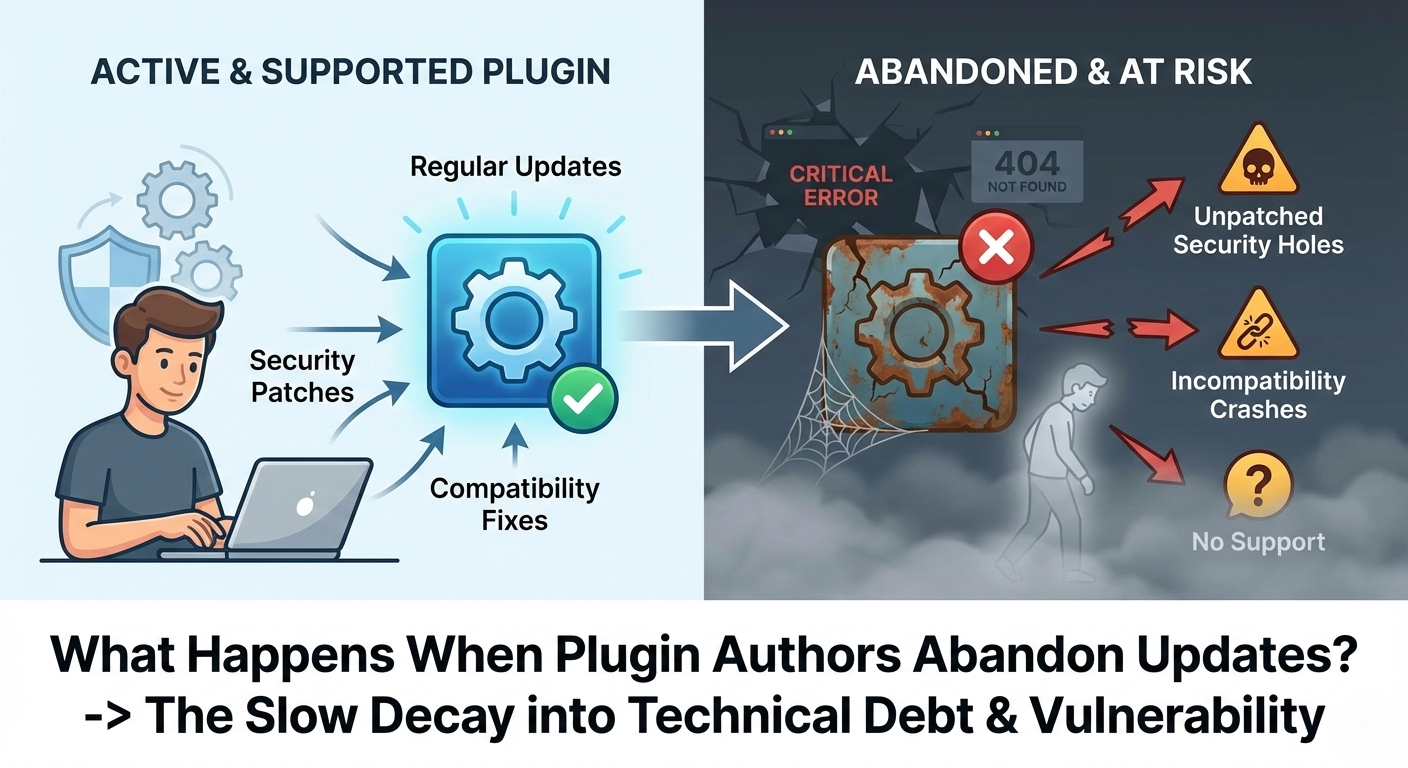
What happens when the plugin is abandoned? When a security flaw is discovered in abandoned code, no patch is coming. The developer isn’t listening.
Hackers know this. They use automated bots to scan the internet specifically looking for websites running known versions of abandoned plugins. Using an abandoned plugin is like knowing the lock on your front door is broken, but deciding never to fix it because “nobody has tried the handle yet.” Eventually, someone will try the handle.
2. The Compatibility Crash
Your WordPress website is a complex machine with many moving parts. The WordPress “Core” software updates frequently. The version of PHP your server runs changes. The browsers your visitors use are constantly evolving.
Actively maintained plugins are updated to ensure they play nicely with these changes.
Abandoned plugins are frozen in time. Eventually, WordPress will introduce a major update that deprecates (retires) a piece of code that your old plugin relies on.
The Result: The dreaded “There has been a critical error on this website,” or the “White Screen of Death.” Your site goes down after a routine WordPress update, and you are left scrambling to figure out which zombie plugin caused the crash.
3. The Support Void
When you use premium or actively maintained free plugins, you have a safety net. If something breaks or conflicts with another tool, you can post on a support forum or open a ticket.
When a plugin is abandoned, the support channels go dark. The developer doesn’t answer emails. The WordPress.org support forum for that plugin turns into a ghost town of unanswered user complaints.
When you encounter a problem with abandonware, you are completely on your own. You have two choices: pay an expensive developer to hack someone else’s old code, or frantically try to find and configure a replacement tool while your live site is broken.
How to Spot a Zombie Plugin Before It Bites You
You should audit your website’s plugin list at least once a quarter. Don’t just look at what is installed; look at its health.
Before installing a new plugin, or when auditing your current ones, check these vital signs on the WordPress repository page:
- The “Last Updated” Date This is your biggest clue. In the fast-moving world of the web, if a plugin hasn’t been updated in more than 6 months to a year, treat it with extreme caution. If it’s been two years, assume it is abandoned.
- The Support Forum Activity Click the “Support” tab. Are the most recent topics resolved? Is the plugin author replying? If the last dozen posts have zero replies from the author, they have likely moved on.
- Compatibility Warnings WordPress.org will often place a banner at the top of a plugin page stating: “This plugin hasn’t been tested with the latest 3 major releases of WordPress.” This is a major red flag.
The Bottom Line
Software is not a “set it and forget it” asset; it is a living thing that requires maintenance.
Hanging onto an abandoned plugin because “it still works right now” is a gamble where the stakes are your website’s security and uptime. If you identify an abandoned plugin on your site, make it a priority to find an actively maintained replacement immediately.
0 Comments