


Ever inherit a WordPress site, open a plugin folder to debug an issue, and immediately regret it? We’ve all been there. A flat directory containing 50 mixed PHP, CSS, and JS files named style-final-v3.css is a nightmare to maintain.
At Scriptudio, we believe that great software starts with a solid foundation. We don’t just write code that works today; we engineer structures that scale for tomorrow.
Today, we’re pulling back the curtain to show you the standard directory structure we use for our premium WordPress plugins.
Why Structure Matters
It’s not just about looking neat. Adhering to strict organizational standards (and following WordPress Coding Standards) ensures:
- Scalability: New features can be added without breaking existing ones.
- Maintainability: Bugs are easier to isolate and fix.
- Collaboration: Any developer on our team can jump into a project and immediately understand where things live.
The Scriptudio Blueprint
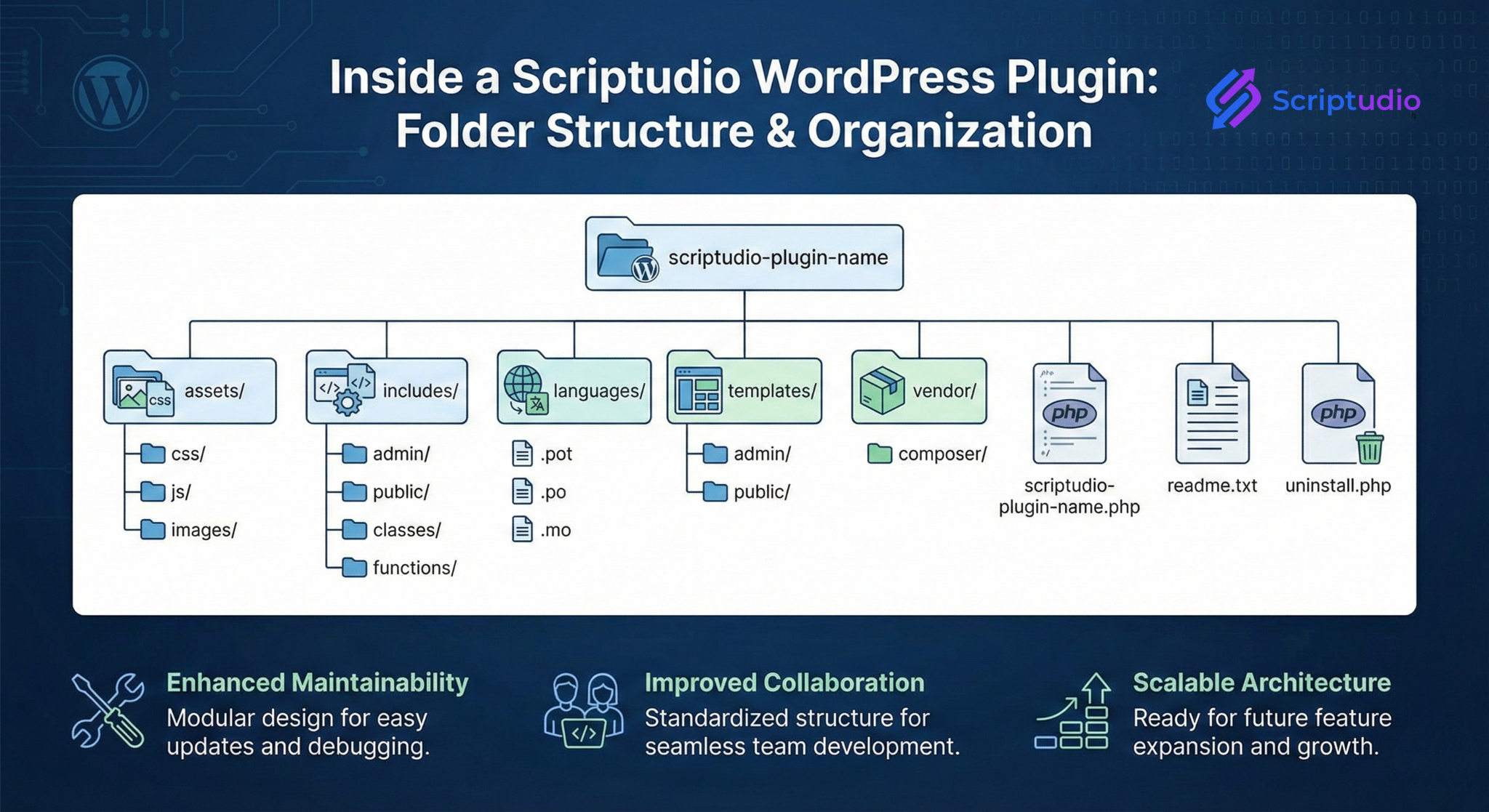
Here is a breakdown of our typical plugin anatomy:
📂 The Root Directory This is kept lean. It usually contains only the main plugin file (e.g., scriptudio-plugin-name.php), the readme.txt for the repository, and the uninstall.php for clean removal.
📂 /assets/ Separation of concerns is key. All static, front-facing files live here, neatly subdivided into css/, js/, and images/. We never mix logic with style.
📂 /includes/ This is the engine room. It holds all the PHP classes and functions that power the plugin. We further organize this into:
- admin/ – Logic specific to the WP Dashboard.
- public/ – Logic for the front-end user experience.
📂 /templates/ If our plugin outputs HTML, we don’t bury it inside PHP functions. We use template files. This allows developers and themers to easily override plugin views without hacking core files.
📂 /languages/ We build for a global audience. All our plugins are translation-ready from day one, with .pot, .po, and .mo files living here.
📂 /vendor/ If we are using Composer to manage external libraries (like PDFs generators or API clients), they are isolated here to prevent conflicts with other plugins.
The Result: Precision Scripts
By sticking to this disciplined structure, we ensure that when you buy a Scriptudio plugin, you aren’t just getting a feature—you are getting a professional, robust software product designed to last.
Developers out there: What’s your biggest pet peeve when diving into someone else’s plugin structure? Let’s discuss in the comments.
0 Comments